patrick@fribourg:~$ cat spotlight.md
The half core that never sleeps
A Mac mini at home serves fornews.ai to all my devices. It fetches the news,
has the on-device model summarise it, and hands everything to iCloud. On that Mac, one system
process, corespotlightd, kept almost half a core busy, day and night.
The obvious suspect was my own app. It wasn't — and finding out who it really was taught me
more than the answer itself.
cat the-hunch.md
The reasoning looked solid. fornews.ai used to put every article into Spotlight, so you could find it from the search bar. Thousands of articles, a summary each, new ones every half hour: surely the indexing was what kept Spotlight awake. So we did what developers do: we shipped a fix. Build 913 added a switch, Index in Spotlight, per device. Off, the app removes what it had given. On the Mac mini it went off, the index emptied.
And the load did not move. Not by a percent. That is the moment I like in this kind of story: the fix is out, the problem is still there, so the diagnosis was wrong. The switch remains useful — on a server you don't need your news in Spotlight — but it answered a question nobody had measured.
diff hunch.txt measure.txt
So we measured instead of guessing. A small
watcher on the Mac mini writes down, once a minute, the CPU time used so far by
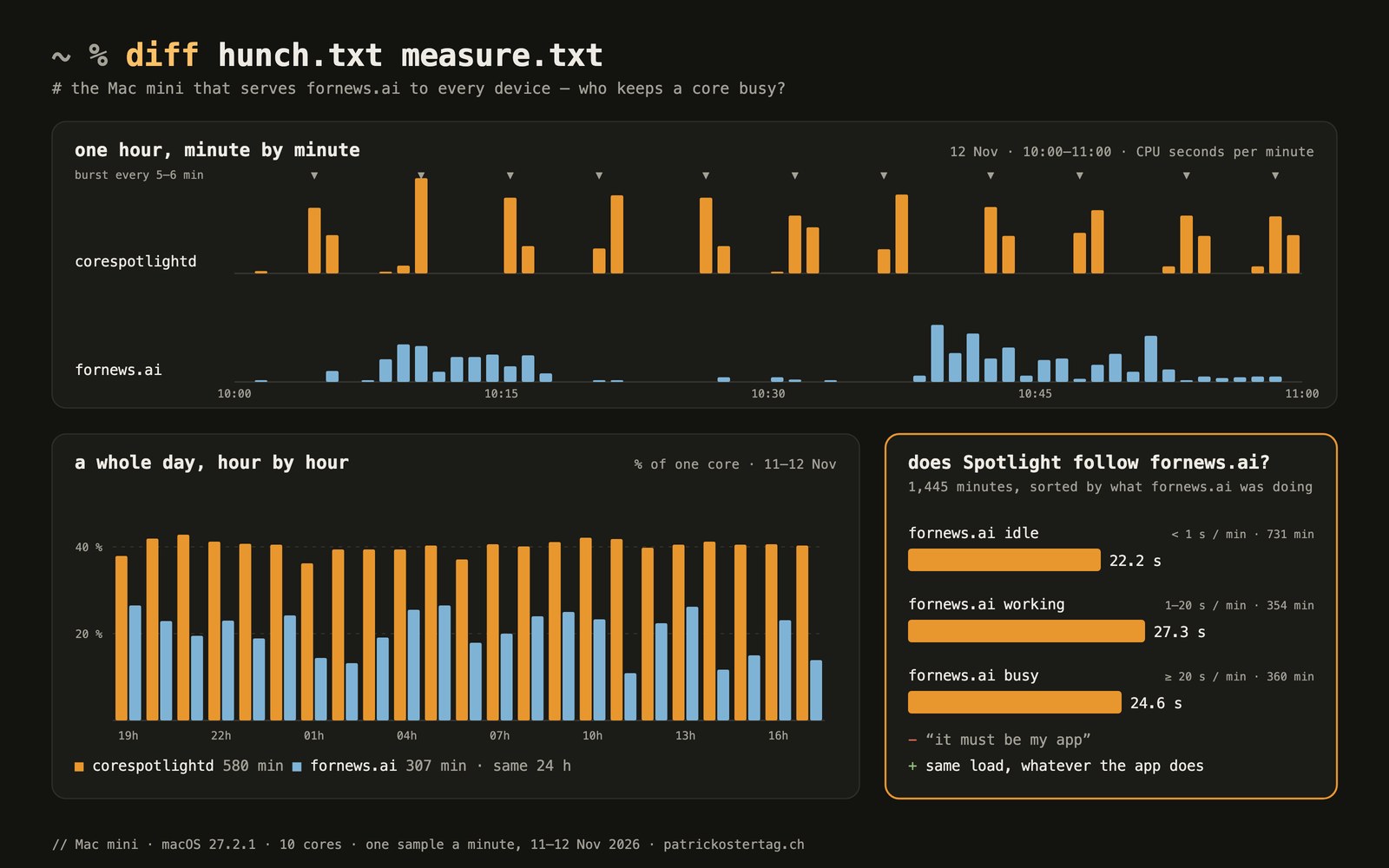
corespotlightd and by fornews.ai. A day of it is 1,445 lines. Then three
questions, three panels.
A metronome, not a reaction
Minute by minute, Spotlight works in bursts, every five to six minutes, like a clock — 123 bursts in eleven hours on 12 November. fornews.ai works in blocks when it fetches and summarises. The two rhythms ignore each other. Hour by hour it is even plainer: Spotlight sits between 36 and 43 % of a core every single hour, including the ones where fornews.ai barely moves.
The test that settles it
Sort the 1,445 minutes by what fornews.ai was doing, and look at Spotlight in each group. If the app were feeding it, Spotlight would climb when the app works. It doesn't: 22 seconds a minute when fornews.ai sleeps, 27 when it works, 25 when it's flat out. And one night, when an iCloud sign-in problem had stalled fornews.ai for seven hours, Spotlight kept exactly the same pace.
log stream | uniq -c
If not my app, who? macOS hides the name of
the app behind each Spotlight query — the logs say client bundle:
<private>. But it doesn't hide the name of the process that writes the log line.
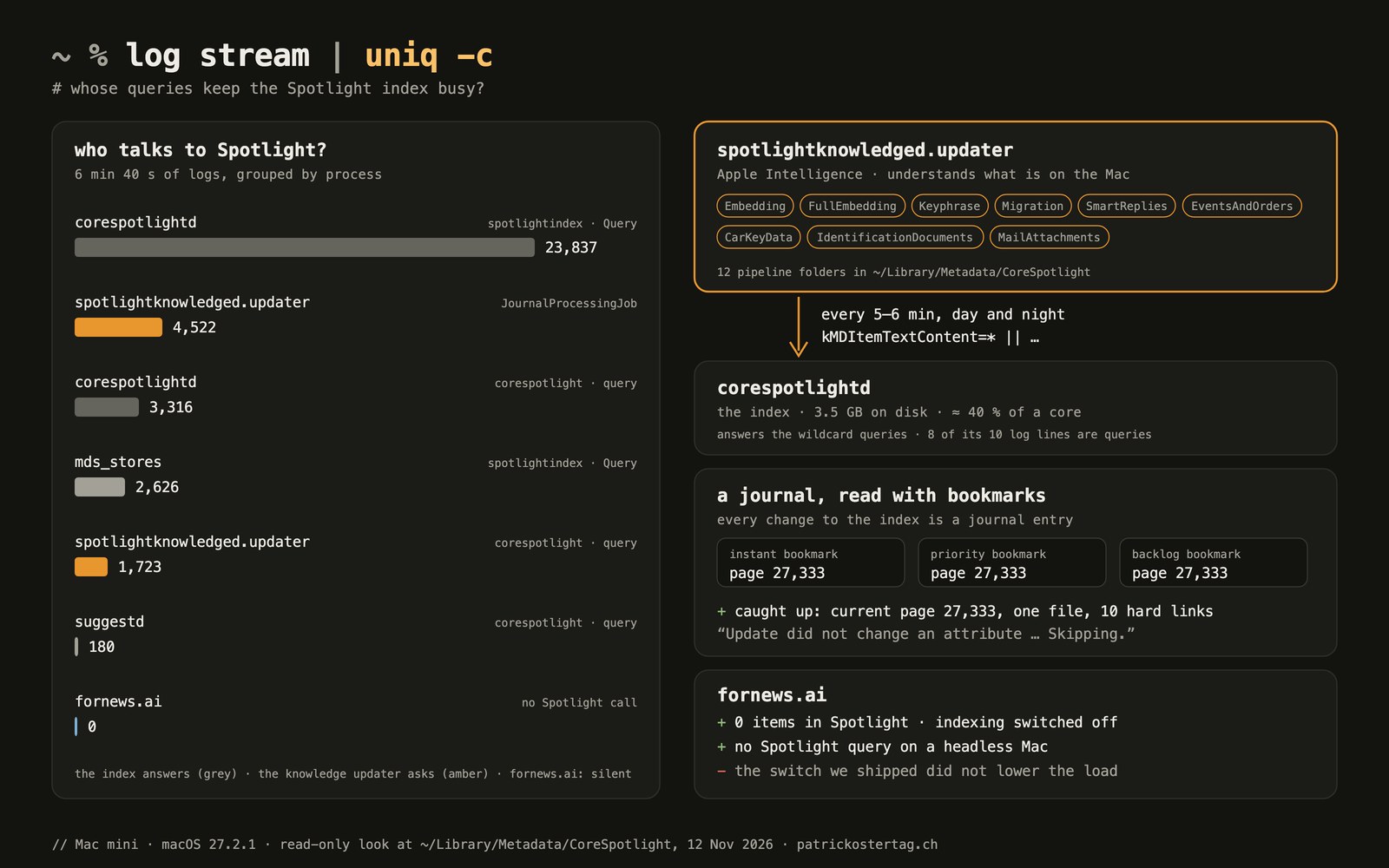
So I listened to Spotlight for six minutes and forty seconds, and counted the lines per process.
Apple Intelligence, reading the Mac
The one asking is spotlightknowledged.updater,
the part of Apple Intelligence that builds its understanding of what's on the Mac. Its jobs
have telling names: embeddings (a vector per document, for search by meaning), key phrases,
smart replies, events and orders, car keys, identity documents, mail attachments, and a
migration still catching up. Every five to six minutes they ask the index for
everything that has text — that is the burst.
Lots of work to find nothing to do
Each job walks a journal of changes to the index, holding its place with a bookmark. On my Mac the bookmarks are up to date — the queue isn't stuck. Most entries end with the same log line: the update did not change an attribute that can trigger reprocessing; skipping. In other words, the expensive part is making sure there is nothing new, and it is done again, every five minutes, around the clock.
cat why-bother.md
Half a core on a ten-core Mac is not a crisis. We could have shrugged. Here is why we didn't, and why I think it's the right reflex for anyone who ships software.
A server is a budget
The Mac mini isn't a desktop that idles: it serves every device, and it shares its cores with the on-device model that writes the summaries. Every steady percent is energy, heat and latency for someone else. You can only spend a budget you can read.
A wrong suspect costs twice
We had already shipped a fix for the wrong cause. Without the measurement we would have kept going — stopping more indexing, cutting features — and the half core would still be there. Measure, then fix, in that order.
Folk remedies are not neutral
The web is full of cures: rebuild the index, delete Spotlight's folders, run a script found on a forum. Some reset private system state with no way back. Knowing the mechanism is what lets you decide not to touch it.
A decision, not a superstition
fornews.ai needs Apple Intelligence to summarise on the device, so turning it off is out of the question. Now we accept the half core knowingly: it's the price of the on-device model reading the Mac, not a leak in our app.
Honest answers to users
Someone will open Activity Monitor on their Data Provider Mac and see
corespotlightd on top. We can now tell them what it is, what it
isn't, and what we measured — instead of “it's probably fine”.
It's how I like to work
The same rule runs through this site and through fornews.ai: machines do the work, a human decides, and the decision rests on something you can show. A chart of 1,445 minutes is something you can show.
cat notes-for-developers.md
If you build for the Mac, or if your app donates to Spotlight, here is what I wish I had known a week ago. Everything below was read on my own machine, without changing anything.
Listen to the right subsystems
The app behind a query is private, the process that logs is not. Stream the Spotlight subsystems for a few minutes, then count lines per process and category:
log stream --level debug --style compact \
    --predicate 'subsystem BEGINSWITH "com.apple.spotlight"' > spotlight.log
# then group by "process | subsystem:category" and sort by count
corespotlightd serves the index that apps
donate to (Core Spotlight); mds_stores serves the file index. Don't
confuse them: the remedies are not the same.
Where the knowledge pipelines live
Under ~/Library/Metadata/CoreSpotlight/DocumentProcessing/PipelineStorage/,
one folder per pipeline (twelve on my Mac: Embedding,
FullEmbedding, Keyphrase,
Migration, the LSSR5… family, the
GLP… family). Each has Journals/ per data
protection class, with numbered .journal pages, their
.toc, and a bookmarks.json holding three
reading positions: instant, priority, backlog. The current page is
the very file of the index (index.spotlightV3/journalAttr.N), shared by
hard links — ten on my Mac. Read it, don't edit it.
Your donations feed it
As far as the logs show, an update to an indexed item becomes a journal
entry that these pipelines then examine — even when nothing that matters to them changed. To give
a sense of scale: in five quiet minutes the main journal page grew by 2.2 KB, while each burst
cost 30 to 120 seconds of CPU. So: don't re-index an
item that hasn't changed (fornews.ai keeps a signature per item and only sends what differs),
send in batches, give items a domainIdentifier so you can remove them
in one call, check CSSearchableIndex.isIndexingAvailable(), and give
users a switch. On a server, “off” is a fine default.
Semantic search: read the forum first
Core Spotlight's semantic search (CSUserQuery,
shown at WWDC24) relies on those embeddings. Developers on Apple's forum report results identical
to plain lexical search, an embedding timeout of 100 ms (error −8007), and, on macOS 27.2, a
bookmark sitting past the pages holding new items, so they were never embedded. The
workaround posted there deletes private state; I would not run it. On my Mac, the bookmarks are
caught up.
Correlate before you accuse
The cheapest tool in this story is the best one: read the cumulative CPU
time of two processes once a minute (ps -o time= -p PID), keep a day,
and compare the suspect's activity with the victim's load. It costs nothing, it's honest, and it
would have saved us a build. One caveat, to be fair: fornews.ai's own CPU does not include the
on-device model, which runs in a separate system process.
cat sources.md
- Measurements: a watcher on the Mac mini that serves fornews.ai, one line a minute, 11–12 November 2026, macOS 27.2.1; one listening session of 6 min 40 s.
- Apple, WWDC24: Support semantic search with Core Spotlight.
- Apple Developer Forums: Core Spotlight semantic search, still non-functional? — timeouts, and the bookmark analysis on macOS 27.2.
- Six Colors: Spotlight and iCloud Drive headbang in the CPU mosh pit — another cause, a large document in iCloud Drive re-indexed at every save.
- The app in question: fornews.ai.
Want your team to measure before it fixes — with AI, and without losing its humans or its data? That's what OK-ia does.
let's talk on ok-ia.ch →